Intune Community Tooling: Essential Tools That Fill the Gaps
Essential community-built tools that answer the questions Intune's portal can't, focused on real operational gaps and practical solutions for Intune administrators.
Microsoft Intune provides solid device management capabilities, but experienced administrators know there are questions the portal simply can’t answer. The community has stepped up with free, non-Microsoft tools that fill these specific gaps.
Below you’ll find functional questions you face as an Intune admin. Click any question to reveal the community tool that solves it, what it does, and when to use it.
Can I quickly check whether a single Intune setting is configured somewhere?
The Tool: IntuneDiff
Most of us learned the hard way that Intune doesn’t help you there. The portal gives you policies, and inside those policies you dig through profile names, categories, sub-categories, and maybe you find the setting you were looking for. But the portal never lets you start from the actual setting. You need to already know which policy it lives in, which is backwards when you just want a yes/no answer.
That’s where IntuneDiff comes in. It flips the whole thing around. Instead of digging through profiles, you just search for the setting itself. Put in the name, IntuneDiff shows you if it exists and in which policy it’s configured. It’s quick and it saves a lot of scrolling and guessing. 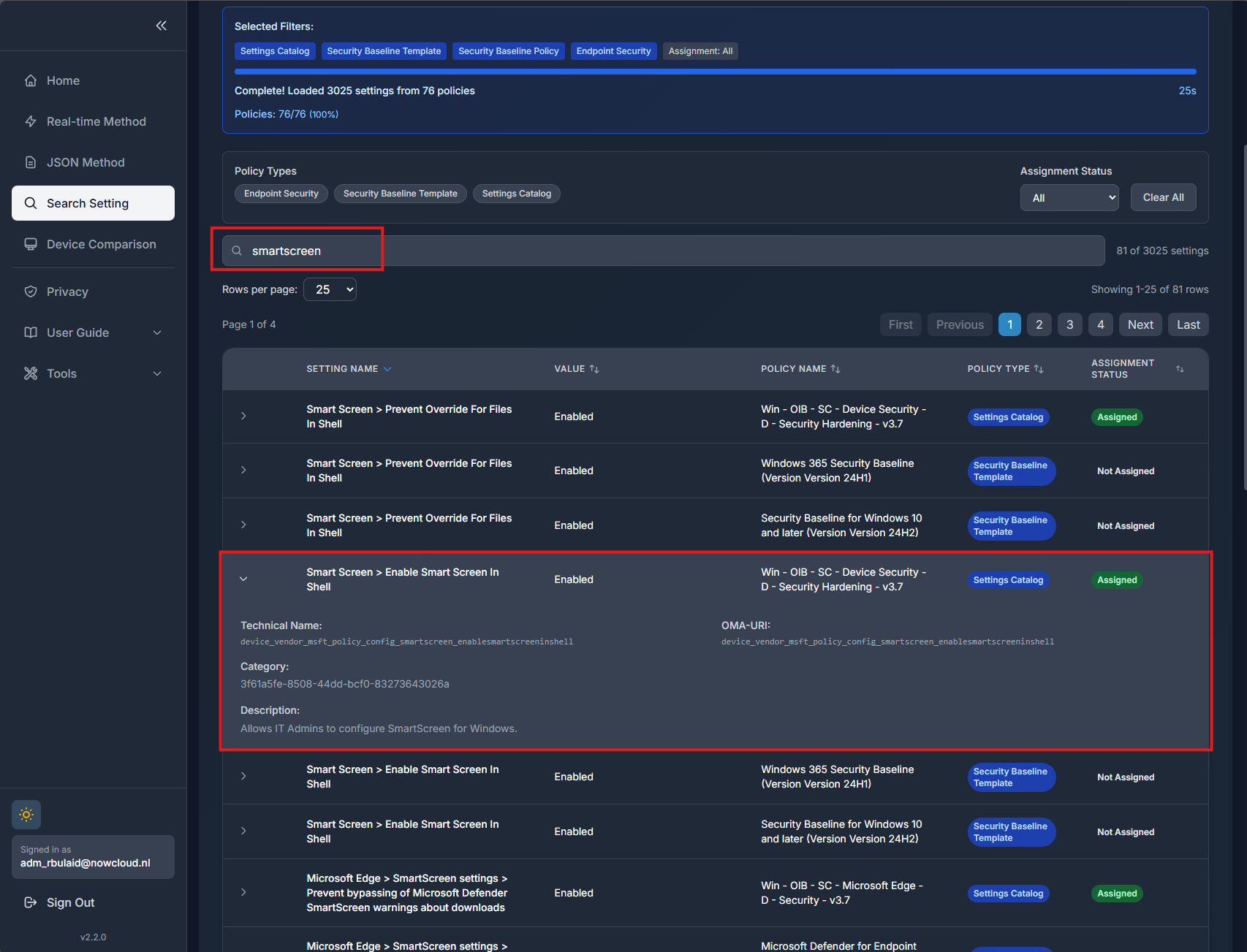
How to get it: IntuneDiff
Which Intune apps, policies, and scripts are assigned to a specific group (and can I safely delete that group)?
The Tool: Intune Assignment Checker
That is a question Intune simply does not answer. You stumble across a group in Entra, and you have no idea which policies are scoped to it, which apps are hanging off it, or whether removing it will break something. The portal forces you to click through every policy and app manually, hoping to spot the assignment.
Intune Assignment Checker removes that guesswork. You install it by running a simple script provided on the site. It handles its own dependencies, then you authenticate interactively. After that you get a small console menu. Option 2 lets you pull assignments for a specific group.
All you do is grab the Object ID from the group in Entra, paste it in, and the tool aggregates everything: app assignments, policy assignments, script assignments, anything tied to that group. You get a single output showing exactly what the group is doing.
Installing the app 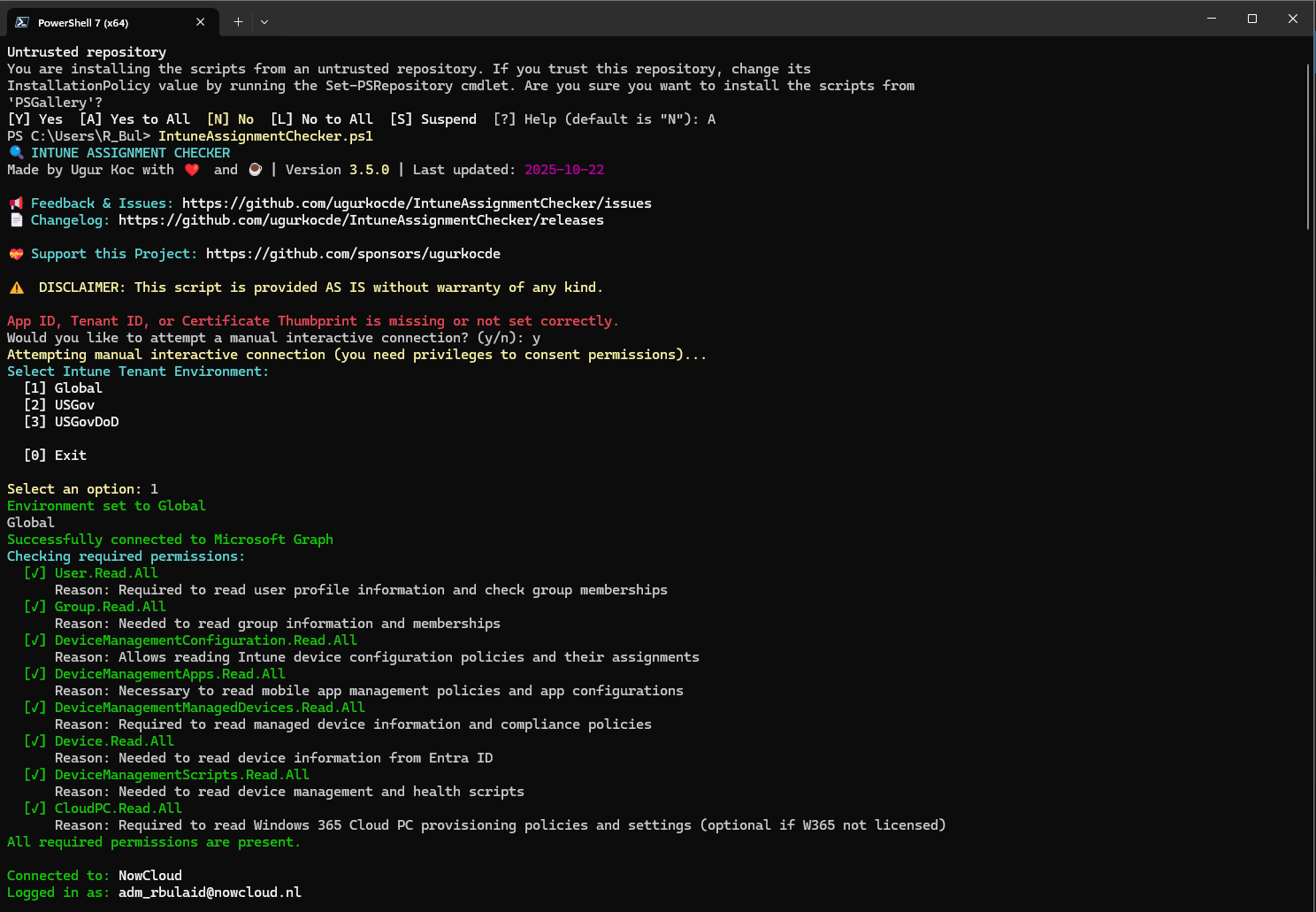
Getting all assignments for a specific group 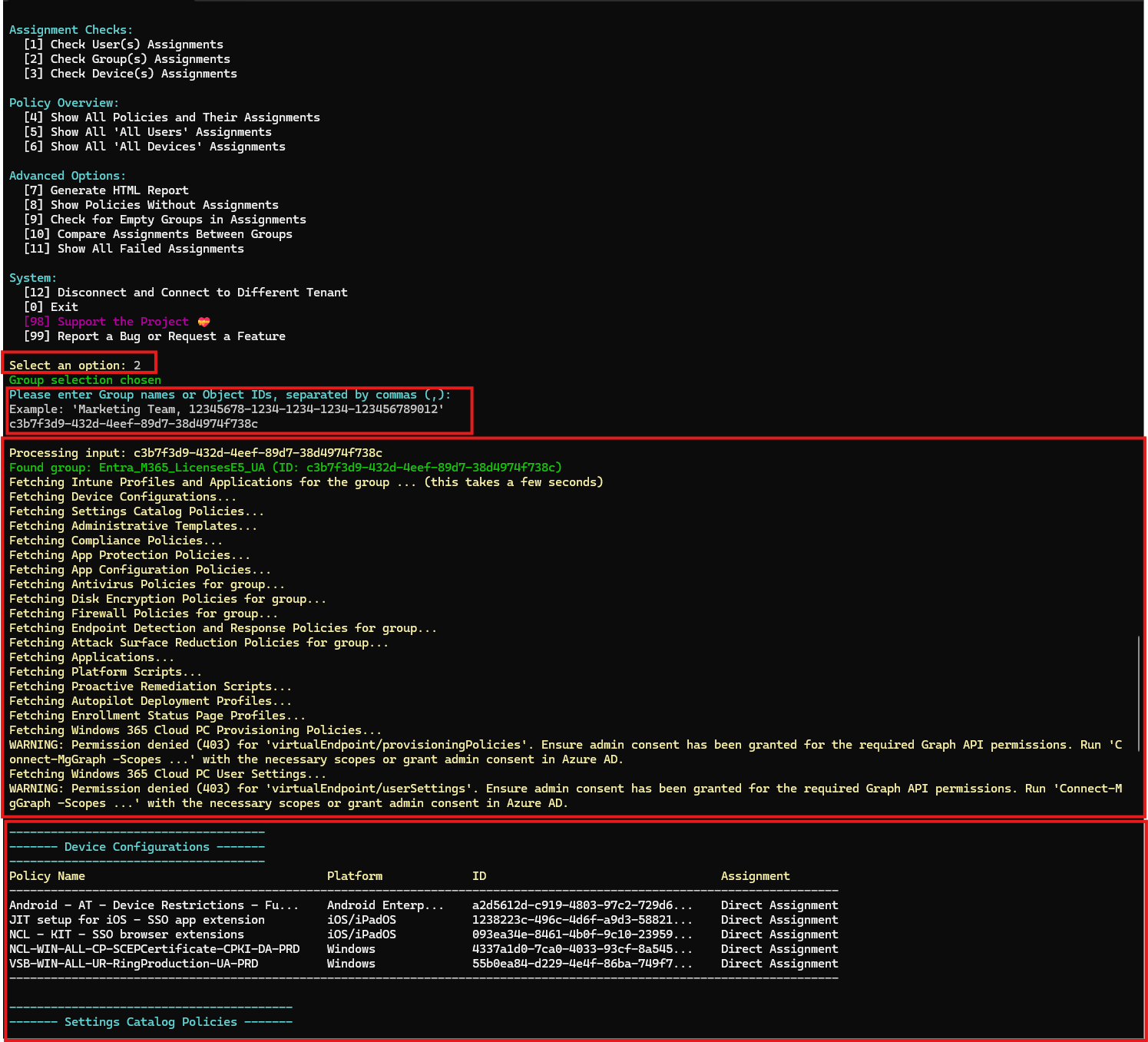
How to get it: Intune Assignment Checker on GitHub
How do I know whether my current policies match the Microsoft Security Baseline for Windows 10 and later?
The Tool: IntuneDiff
That baseline is one of the most-used references Microsoft ships in Intune, but Intune itself gives you zero visibility into whether your own configuration is actually aligned with it. If you are not deploying the baseline template directly, you are basically guessing.
With IntuneDiff, you pick the Security Baseline for Windows 10 and later, set it as the reference, and compare it against your own Settings Catalog policies. IntuneDiff shows you exactly where you match the Microsoft baseline and where you drift, covered settings, conflicts, extra settings, everything in one screen.
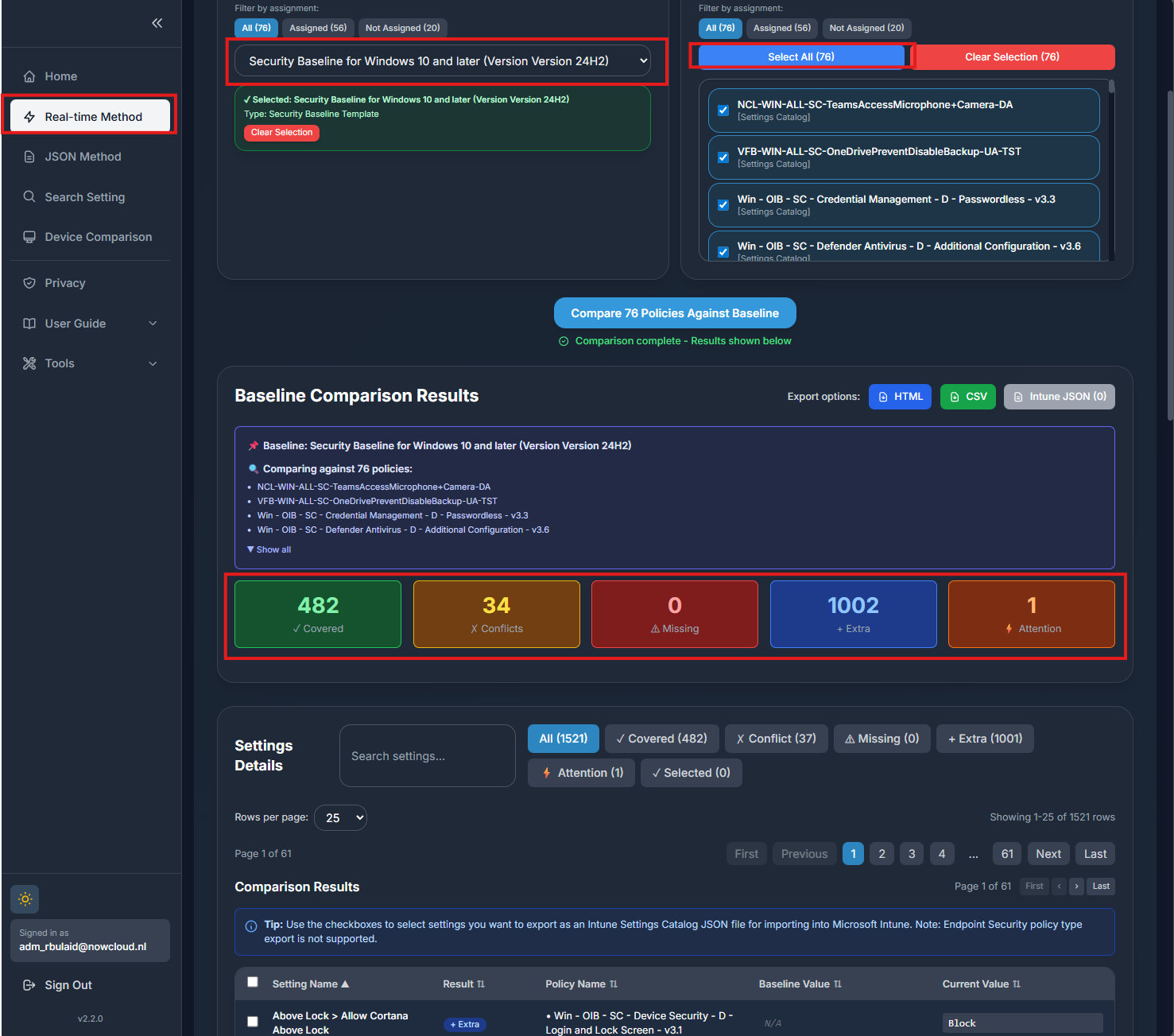
How to get it: IntuneDiff
How do I bulk-add or bulk-remove group assignments across multiple Intune policies / scripts / apps?
The Tool: IntuneToolkit
Doing that natively in Intune is painful. You click into one policy at a time, open Assignments, add/remove the group, save, repeat. If you need to update 30 policies, enjoy the next 20 minutes of your life.
The Intune Toolkit fixes that workflow. You grab it from GitHub, run the included PowerShell script, and it launches a small GUI. One button connects you to Graph, and from there you can filter on group display names, policy names, or both at the same time, stacking search terms until you have exactly the slice you need.
Once filtered, select as many policies as you want and remove or add assignments in bulk. And it is not limited to policies, you can do the same thing for apps and scripts as well, using the exact same interface.
You can even sort by a specific group name, which is great if you want a single view of which policies are assigned to one particular group.
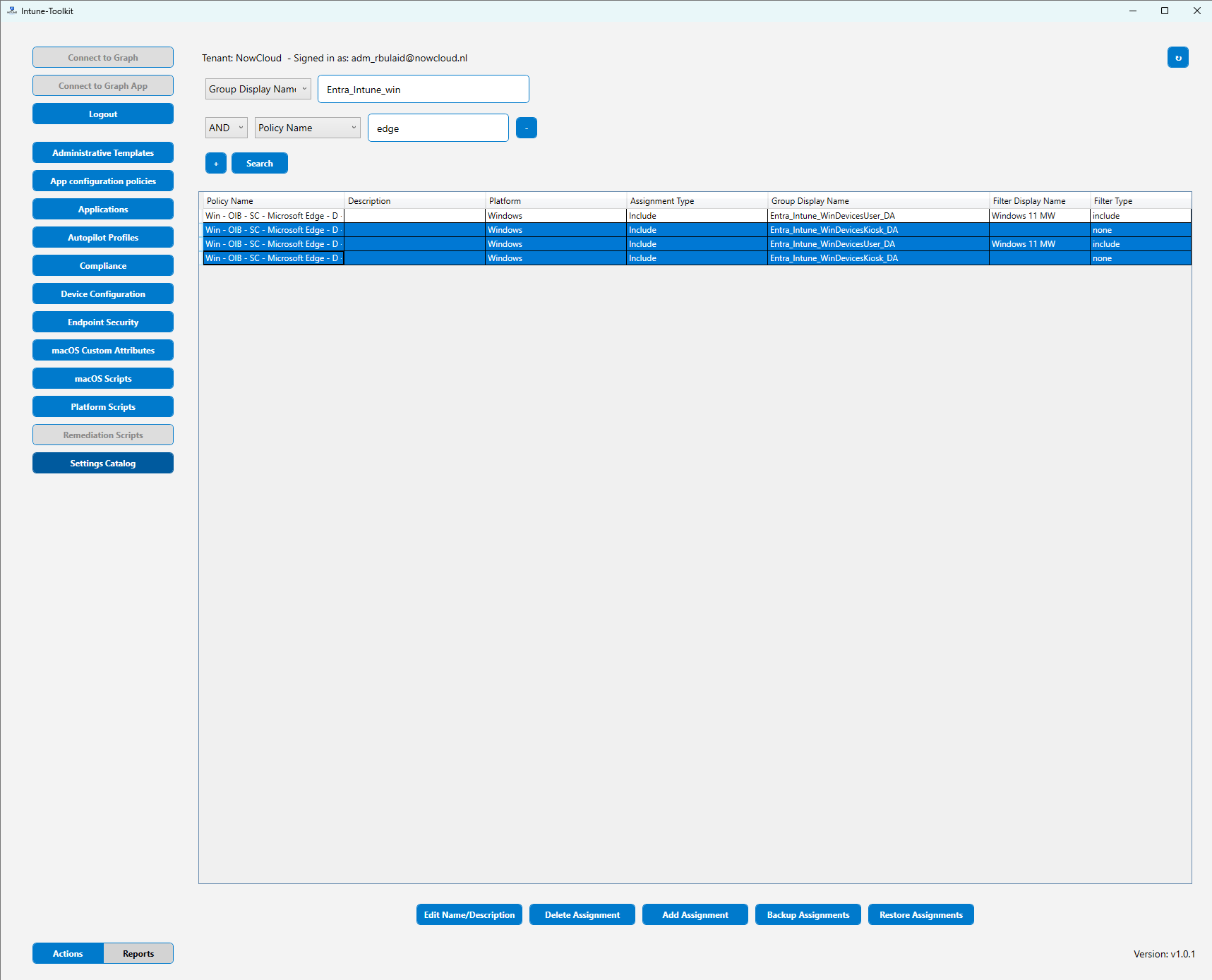
How to get it: Intune Toolkit on GitHub
How do I bulk-export or bulk-import Intune policies and configuration across tenants?
The Tool: IntuneManagement
Every Intune admin knows this need: you want to lift policies out of one tenant, store them, and push them into another tenant without rebuilding everything by hand. The tool almost everyone in the community uses for that is Intune Management.
Same pattern as the others: you download it from GitHub, run the PowerShell launcher, and a GUI opens. Sign in through Graph, grant the required permissions, and you are in. From there you can select policies and export them to a local path, or take local JSON exports and import them straight into a tenant.
Assignments can be included as well, which is a big win. When you import with assignments enabled, the tool automatically creates the missing groups in the target tenant and applies them to the restored policies. It is extremely useful when you maintain a Golden Image or Reference Tenant, where you store your baseline configuration. With Intune Management, you can export that baseline and drop it into a new or existing tenant in one shot.
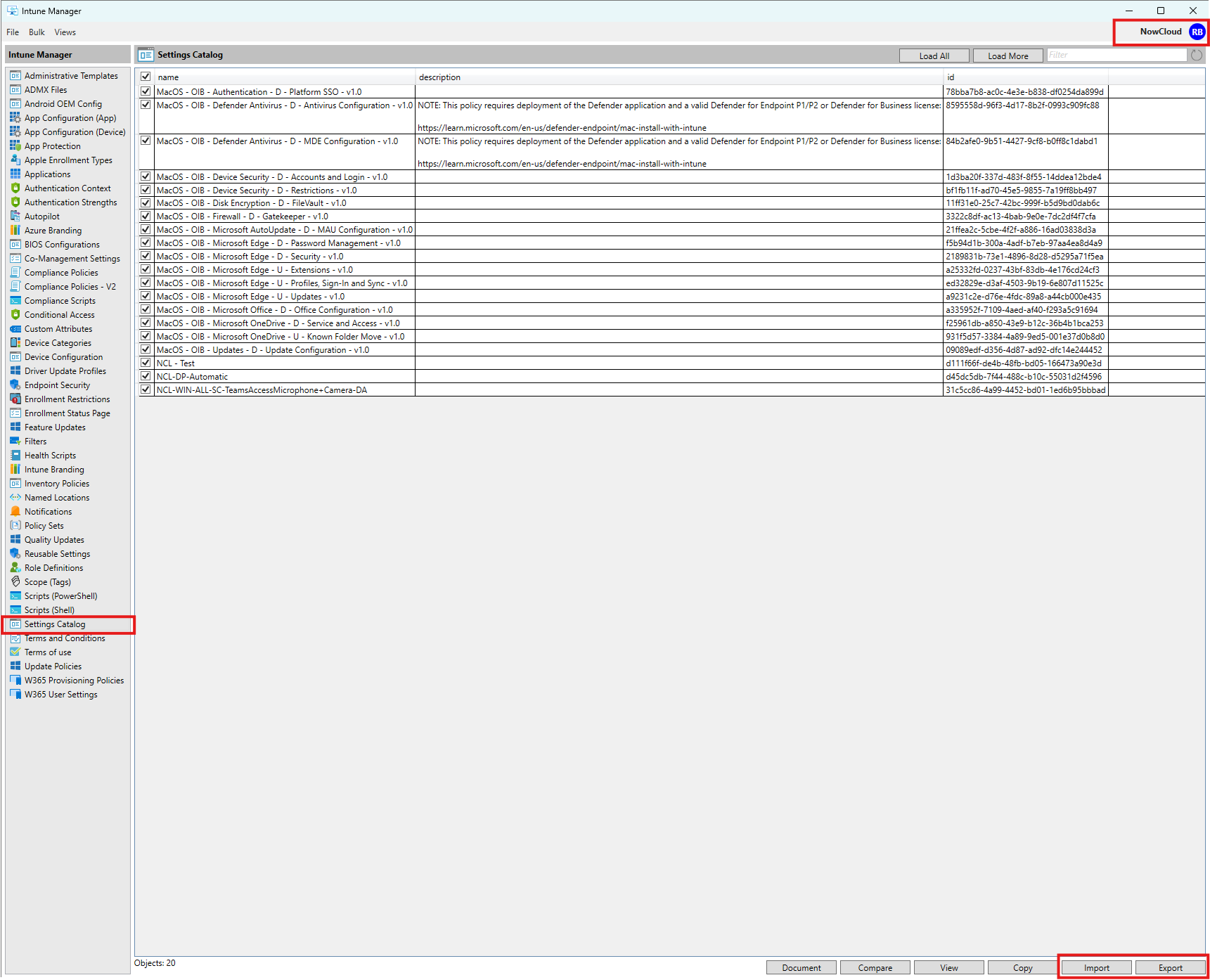
How to get it: Intune Management on GitHub
How do I document my Intune environment at a setting-level?
The Tool: IntuneManagement
Most admins never do this properly because Intune gives you no native documentation export. You either screenshot the UI, dump JSON, or give up. The easier option is again the Intune Management Tool, because it includes a built-in Document feature.
You can export documentation in CSV, HTML, Markdown, or Word. Word is usually the winner, because it generates a clean report with policy names, configuration values, and all the settings expanded in human-readable form. There are other community tools that can do this too. But when it comes to formatting, layout, and producing a clean, polished document, Intune Management still comes out on top. 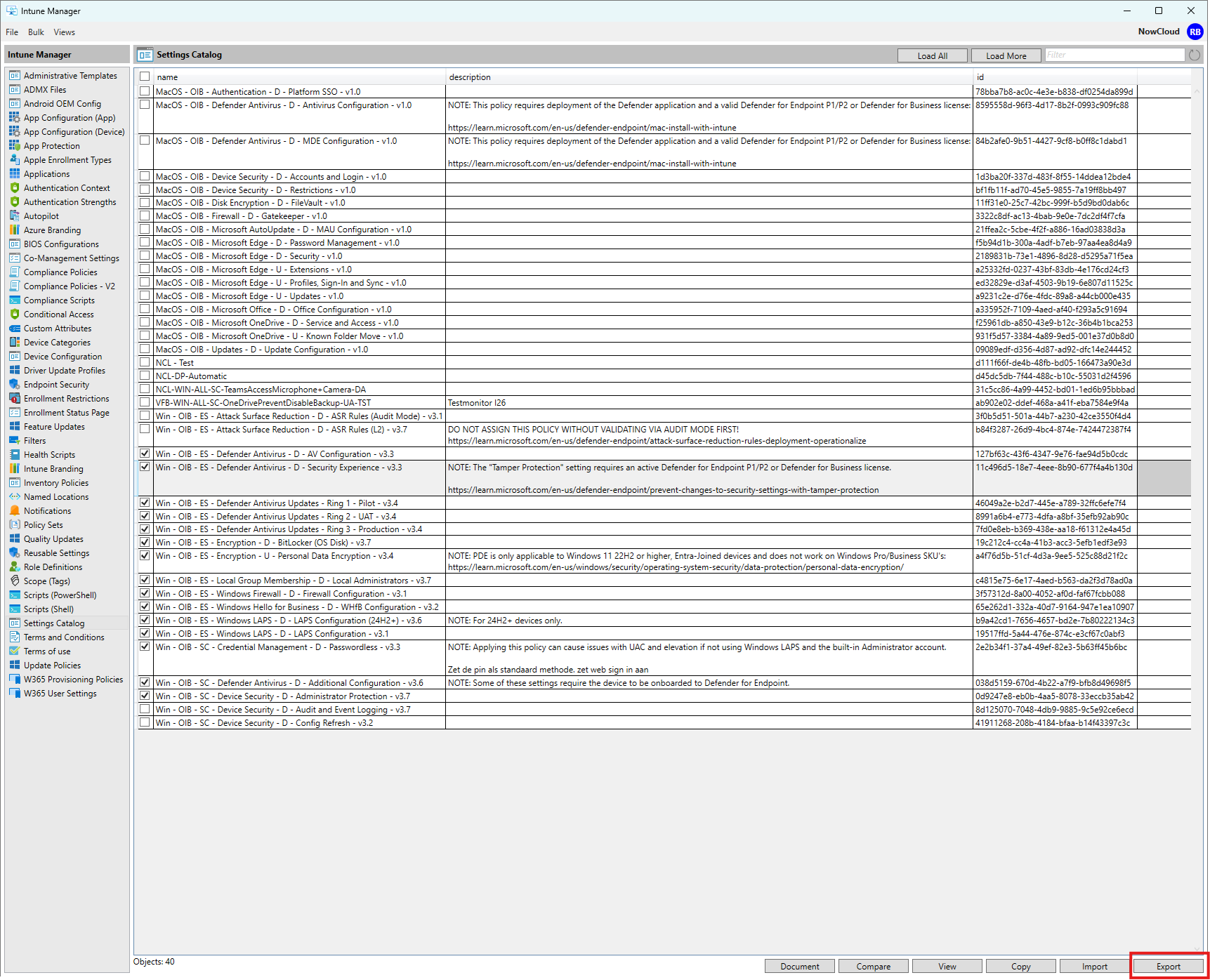
The Word export 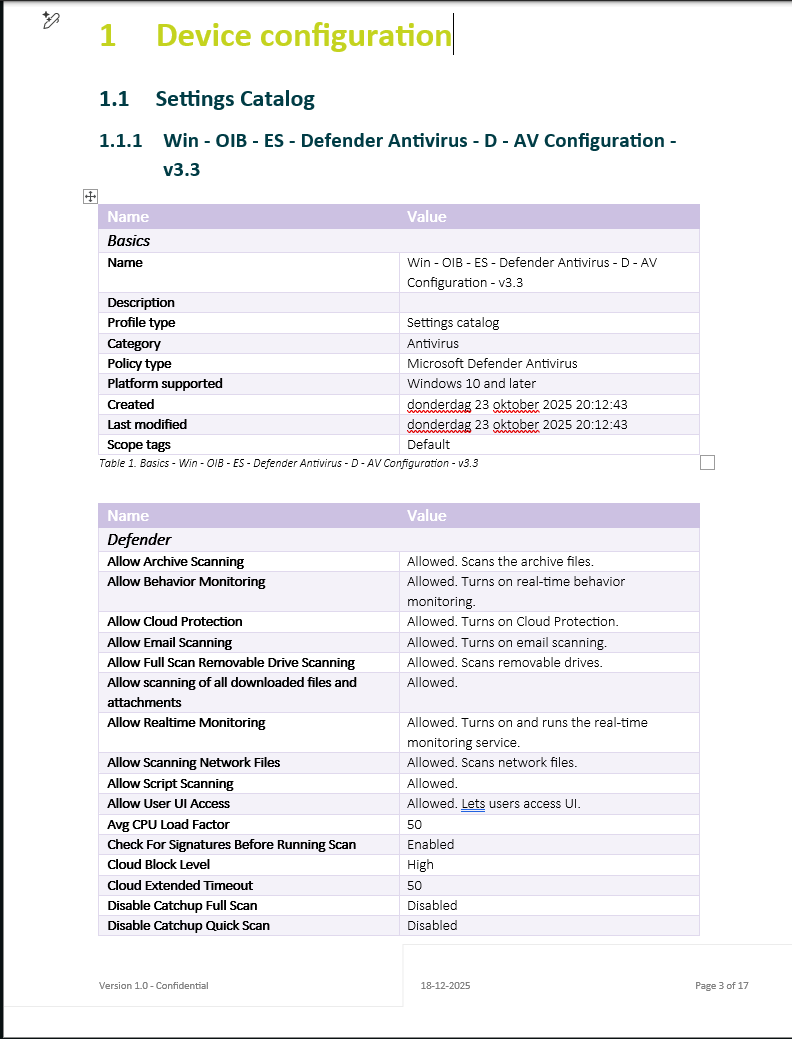
The HTML export 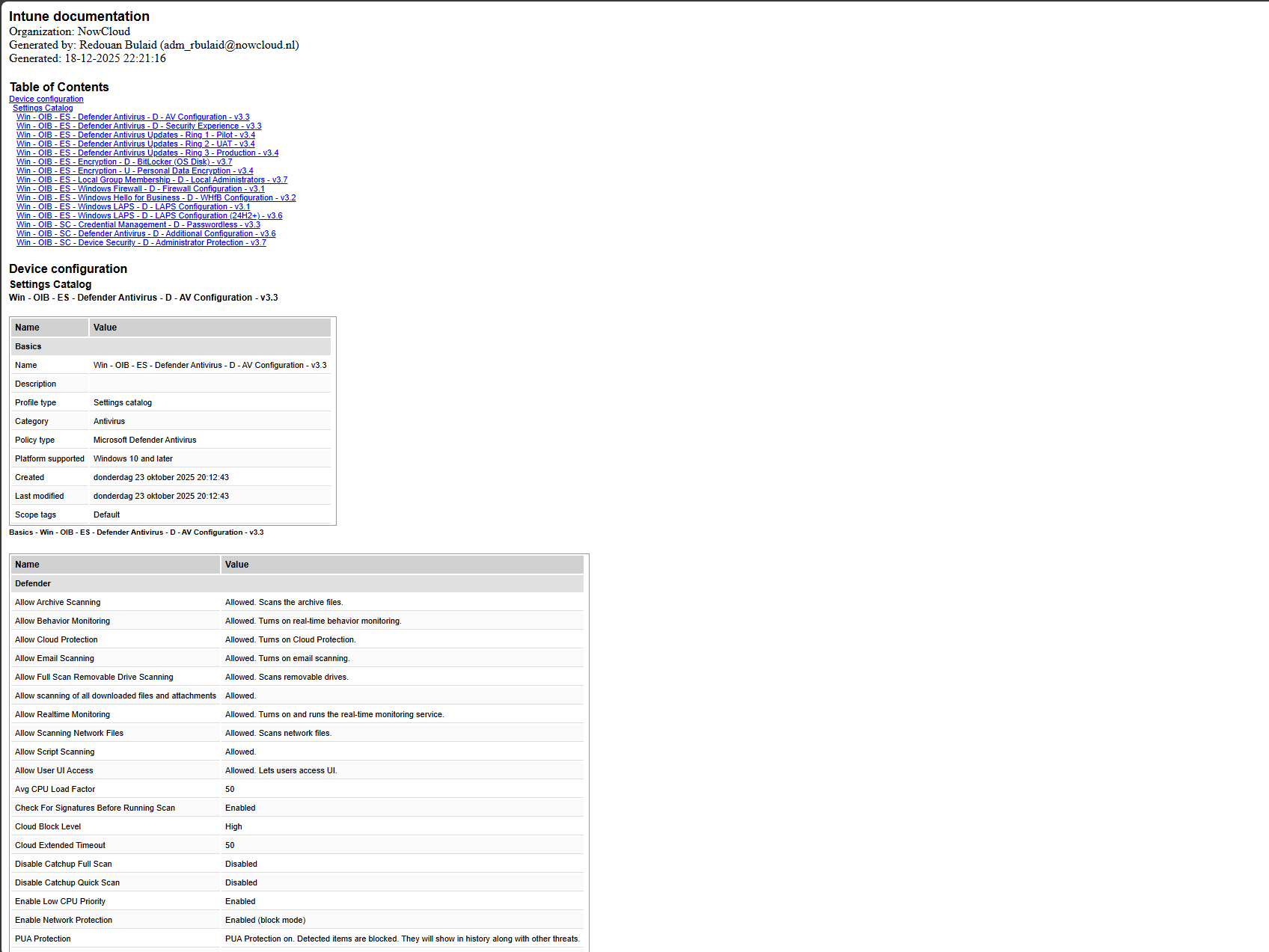
How to get it: Intune Management on GitHub
How do I identify which devices are registered in Autopilot or Intune (and which ones are missing), and how do I bulk-offboard devices?
The Tool: Device offboarding manager
Anyone who has worked in Intune knows the pain: Autopilot and Intune never give you a clean, two-way overview. You can see Autopilot devices. You can see Intune devices. But you never get a simple answer to “which devices are in Autopilot but not in Intune, or vice-versa?” And when you want to remove devices in bulk, the Intune portal caps you at 100 and gives you no real filtering.
That’s exactly what the Device Offboarding Manager fixes. Same deal as the other community tools: download it from GitHub, run the GUI launcher, authenticate through Graph, approve the permissions, and you get a clean dashboard showing how many Intune, Autopilot, and Entra devices exist in the estate.
Two playbooks in particular answer the core functional question:
- Which Autopilot devices are not in Intune?
- Which Intune devices are not in Autopilot?
Beyond that, the bulk offboarding workflow is the real win. You can import a list of devices and remove them from the tenant at scale, without getting stuck in the 100-device UI limit or trying to scroll-select your way through the Intune portal. It is simply faster, cleaner, and more reliable.
The two playbooks 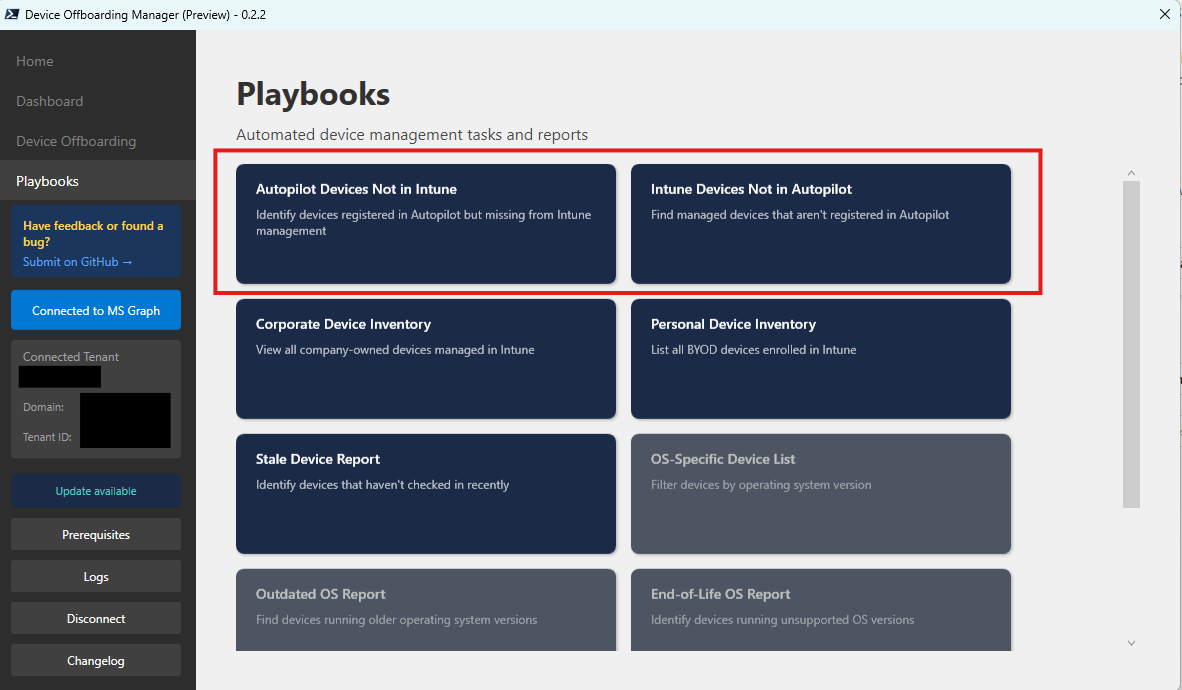
The default dashboard 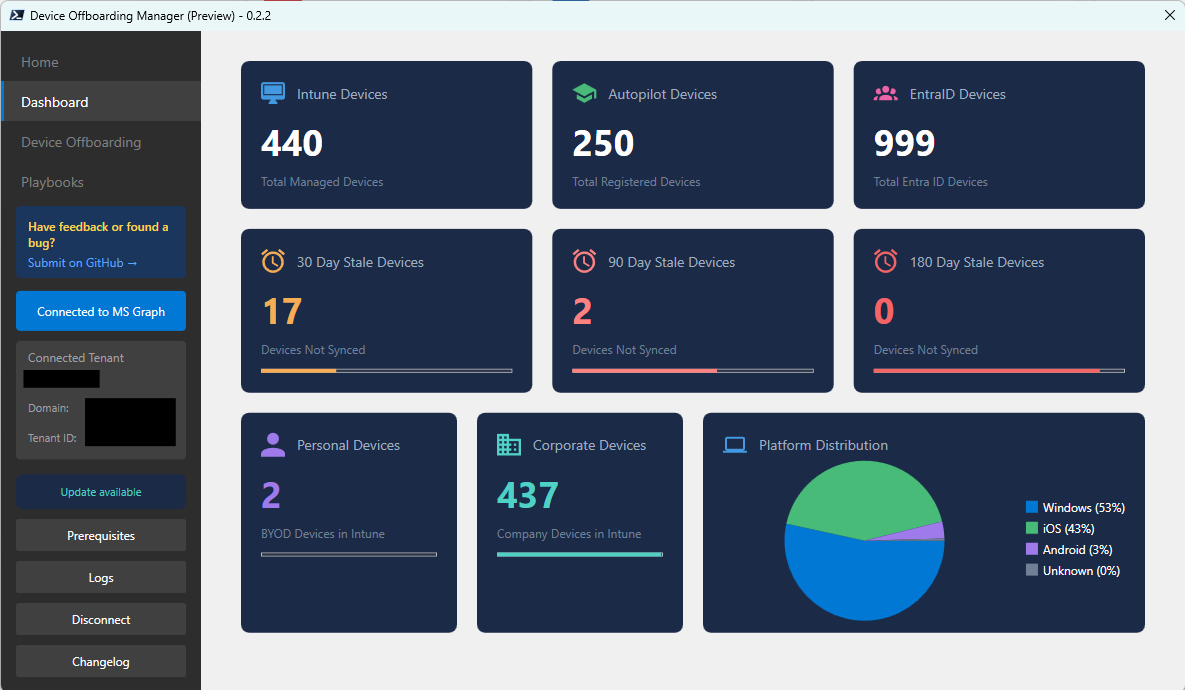
Bulk import that’s necessary for the bulk offboarding 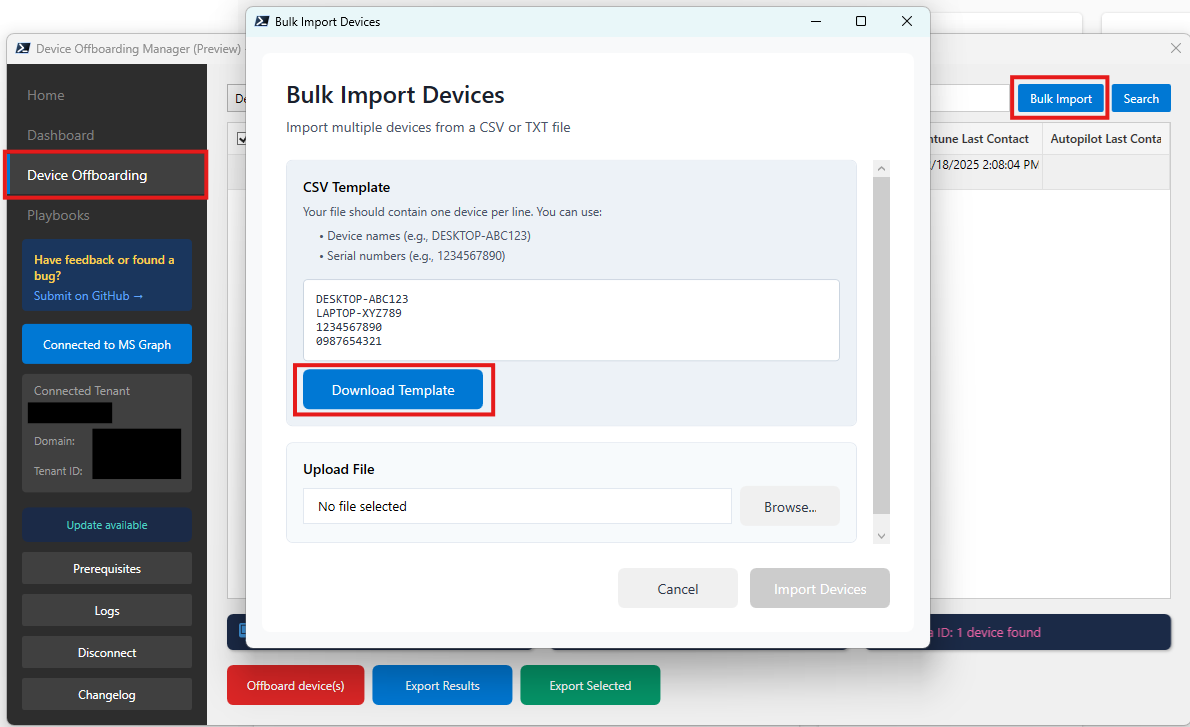
How to get it: Device Offboarding Manager on GitHub
What These Tools Tell Us
The pattern is simple: Intune gives you the configuration, but not the visibility you need. IntuneDiff lets you search settings backwards to policies. Assignment Checker shows you what’s pinned to a group. Device Offboarding Manager reveals mismatches between Autopilot and Intune. They all take data that exists in your tenant and make it visible the way the portal should.
They’re not replacing Intune, they’re just asking better questions of the data that’s already there.
Why hasn’t Microsoft built these? Intune is a multi-tenant service at massive scale. Deep dives and complex bulk operations aren’t the priority at that level. The community handles what the core product doesn’t need to. Test these tools in dev first. Understand their permissions. Be smart about the data. And if you improve one, share it back, that’s how the ecosystem stays useful.